



Autoconnect Ltd’s web sites use cookies in a number of ways to benefit you. If you would like to know how we use them, please read this article. (more…)
Read MoreEnhanced Tyre Information Input
Posted by iang on Nov 13, 2018

It is now possible to input more detailed tyre information and descriptions on the system if required. Technicians can specify the tyre seasonal type fitted (Winter, Summer, All Season etc) and can also input specific data against individual red and amber tyres such as tyre model (eg PZero, EcoSport etc), DOT Codes (eg 1418) and tyre type (eg Run Flat, Extra Load etc). Photos and notes can also be added to Red and Amber tyre job lines. Red...
Read MoreVideo Integration
Posted by iang on Mar 8, 2018

The latest development in EVHC brings integrated video functionality to the system. Capture additional work opportunities and send videos direct to the customer, ensuring enhanced trust and transparency and providing the credibility for improved upsell. Contact us now on 01527 66444 for more details or email us at info@autoconnect.co.uk.
Read MorePart Number integration
Posted by iang on Mar 8, 2018

Mitsubishi and Mazda Parts file integration is now available in the Parts Detail screen. Entering a Part Number will automatically populate the EVHC Parts detail screen with the Part description and retail price. Contact us now on 01527 66444 or email us on info@autoconnect.co.uk. to add this functionality.
Read MoreGDPR May 2018
Posted by iang on Mar 8, 2018

The anticipated changes to GDPR due for implementation in May 2018 will necessitate some modifications to the way in which Autoconnect manage and process your customer data through EVHC. We will be contacting users directly before this date to clarify any necessary changes and to agree specific individual processes, but in the meantime we have produced a brief document to outline our intended actions. A PDF copy of this document can be...
Read MoreJob Timing Activity Report
Posted by iang on Mar 8, 2018

Improvements to the time stamps within EVHC now make it possible to provide a report to show time taken to complete the separate stages of the Health Check process. Technician time to complete a Check, Parts time to price a job and Service time to confirm an outcome are now all recorded and stored. This new Report is available within the Reporting Suite under the ‘Activity’ tab.
Read MoreEVHC Performance Overview
Posted by iang on Mar 8, 2018
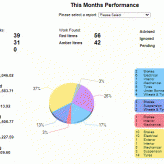
For a quick and simple overview of system usage and performance, daily, weekly and monthly, don’t forget to click on the ‘Performance’ tab in the Workshop Management screen to get a clear and graphic illustration of actual ‘live’ and historical activity on the key elements of EVHC.
Read MoreDetailed EVHC Reporting
Posted by iang on Mar 8, 2018

For a more comprehensive and detailed analysis of EVHC performance, the Reporting suite contains all the information required to drill down into all aspects of EVHC usage. Separate reports for all elements of the system are available and drop down menus and expansion buttons allow you to customise the data displayed to suit your requirements. All reports can be downloaded to excel to allow further manipulation and review. For help on using...
Read MoreEVHC v5 Update : New Feature List
Posted by ianb on Dec 6, 2012

EVHC version 5 brings many new features and helpful tweaks. An overview is available here. (more…)
Read MoreAn Introduction to EVHC
Posted by ianb on Nov 21, 2012

A video introduction to our EVHC Workshop Management system detailing the ease of use of our Electronic Vehicle Health Check System and some of the main features. (more…)
Read MoreSubscribe to Updates

Menu
Recent Updates
- How We Use Cookies
- Enhanced Tyre Information Input
- Video Integration
- Part Number integration
- GDPR May 2018
- Job Timing Activity Report
- EVHC Performance Overview
- Detailed EVHC Reporting
- EVHC v5 Update : New Feature List
- An Introduction to EVHC
- Multi-View Body Check
- Viewing Previous Health Checks
- Overdue Contacts Update
- Health Check Print Settings
- EVHC Pushes Aftersales Revenue Over Targets
- Weekly KPI Email Report Update
- HOW TO: Alert Parts to Pick Stock
- How To: Hide Prices on Health Check Reports
- Redesigned Deferred Contact Diary
- How To: Add a Body Check on a Hand-Held/iPod
- How To: Add a Body Check in Workshop Management
- EVHC Body Check
- How To: Add a Sales Advisor
- How To: Add a New User
- How To: Add EVHC to Trusted Sites
- View the EVHC Touch Screen Device
- How To: Reset Wireless Network Settings on an iPod or iPhone
- Do I need a Health Check Management System?
- What does a customer text message reminder say?
- How To: Edit Tyre Depths & Sizes
- All Jobs Require Pricing Email Alerts
- EVHC Analysis Age Breakdown
- Call Analysis by Contact Closed Date
- Exporting Reports to Microsoft Excel
- Add Work or an Advisory to a Health Check
Read More
